
For QA Engineers, Operators & Recruiters

Test Multi-Page Google Forms & Run CSV Batches Without Brittle Scripts

Stop spending 5 minutes typing dummy data every time you edit form branching logic or intake sheets. Populate every required question, scale, grid, and dropdown in 1 click.

3 QA & Operations Workflows Built Right In

Form Deck combines quick random data generation, deterministic template replay, and structured CSV stepping inside one lightweight Manifest V3 extension.

QA

1. QA Random Fill (<0.2s)

Verifying required-field validation or section branching? Click QA Random in the Quick Dock to generate context-aware emails (qa.userXXX@example.com), phone numbers, valid dates/times, radio choices, scales, and grid cells automatically.
Mem

2. Capture & Replay Regression

Fill a multi-page edge-case test once, click Capture, and Form Deck indexes every response by Google's data-item-id and question title so you can replay Page 1, 2, or 3 cleanly after edits.

CSV

3. CSV Batch Row-by-Row FREE IN v1.0

Paste or upload a CSV/TSV test matrix. Column headers automatically match question titles so you can step cleanly through CSV Row 1/N directly from the Quick Dock.

Tested on Complex Controls

Handles Scales, Grids, Dates & "Other" Inputs Cleanly

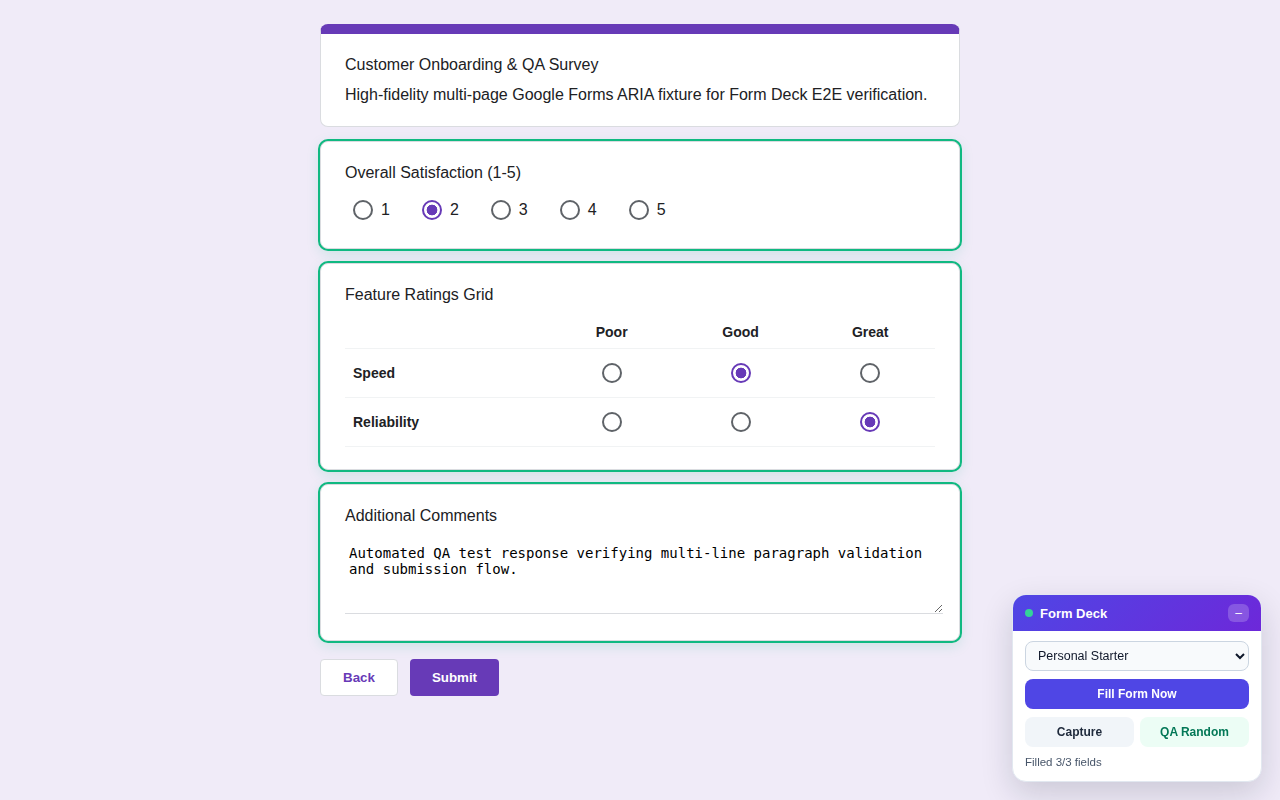
Google Forms renders radio grids, linear scales, and split month/day/year inputs using ARIA attributes and internal Wiz listeners. Form Deck dispatches pointer, input, and change events and visually outlines every filled question in green so QA reviewers spot missed required items instantly.

  • Multiple Choice & Checkboxes including Other: text box
  • Linear Scale (1–5 / 1–10) & Multi-Row Radio/Checkbox Grids
  • HTML5 Date/Time and split Month/Day/Year or Hour/Minute fields
  • Custom Regex & Keyword Rules (e.g. match /order\s*id/i)
Form Deck filling Linear Scale, Feature Ratings Grid, and Paragraph on Page 2 of a Google Form

Sample CSV Batch You Can Copy & Test

Form Deck automatically detects comma (,), semicolon (;), and tab (\t) delimiters and matches column names to form questions.

Full Name,Email Address,Department,Overall Satisfaction
Batch User One,batch1@example.com,Engineering,5
Batch User Two,batch2@example.com,Product QA,4
Batch User Three,batch3@example.com,Operations,5

How Form Deck Resolves Every Answer (Priority Order)

When you press Fill Form Now (Alt+Shift+F), Form Deck resolves each visible question in strict priority order:

  1. Active CSV Batch Row: Matches CSV header against normalized question title.
  2. Saved Form Memory: Matches captured answers by exact itemId first, then normalized title.
  3. Profile Custom Rules: Checks your contains or regex keyword rules.
  4. Smart EN & VI Field Matching: Maps 14 standard fields (Name, Email, Phone, Company, Role, Address, City, Country, Website, Age, Gender, Notes).
See Free v1.0 & Roadmap →